|
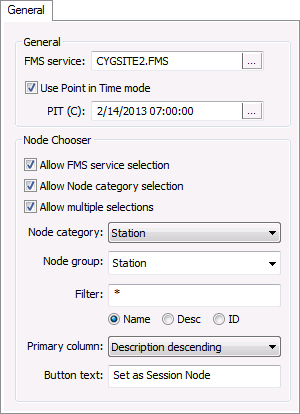
FMS service
|
Type the name of the Site.Service to which to connect in the control's Chooser, or click ... to access the Select Service dialog box.
|
|
Use Point in Time mode
|
Click the check box to select/clear the option to use the Point in Time mode.
|
|
PIT (C)
|
If Use Point in Time mode is selected, do one of the following.
- Type the desired date/time value into the text box.
- Click ... to access the Select Date and Time dialog box, then enter the date/time, in Contract time (C), from which you want to view data.
Default value is T, date and time today.
See Using the Home Menu for more information about PIT mode.
|
|
Allow FMS service selection
|
Click the check box to select/clear the option to show the FMS service selector in the control's Chooser.
|
|
Allow Node category selection
|
Click the check box to select/clear the option to show the Node category selector in the control's Chooser.
|
|
Allow multiple selections
|
Click to allow multiple selection of Nodes in the control's Chooser list.
|
|
Node category
|
Select the desired Node Category to display in the control's Chooser from the drop-down menu.
Options are as follows.
- <Any> - any available Node category
- Group
- Device
- Gas Device
- Liquid Device
- Station
|
|
Node group
|
Select the desired Node Group type to display in the control's Chooser from the drop-down menu.
Options are as follows.
- <All Nodes>
- General
- Station
- By Category
|
|
Filter
|
First type a partial string of known Node name/description/ID characters to populate the filter text box.
Wildcard values * (multiple character) and ? (single character) are supported.
Default value is * (multiple character wildcard) - all.
Note: Wildcards can be used only when filtering by Name or Desc, not when filtering by ID.
Then select a Node option to filter for results.
Options are as follows.
|
|
Primary column
|
Select the desired primary sort column in the control's Chooser from the drop-down menu.
Options include the following
- Type ascending
- Name ascending
- Description ascending
- Type descending
- Name descending
- Description descending
Default value is Name ascending
|
|
Button text
|
Type the text for the button in the status bar of the Node Chooser control.
Allowable characters (maximum of 20) are A-Z, a-z, 0-9, . (period), #, $, &, (, ), +, -, \, /, :, <, >, =, @, [, ], ^, {, }, _ (underscore), !, ~ (tilde). Spaces are acceptable, when they are not leading or trailing.
|
 The CygNet FMS Node Chooser Control is an ActiveX control that serves as the primary data navigation control in CygNet Measurement. Use the Node Chooser control to select Nodes by group, Node category, or name, in order to filter the available Nodes down to a manageable number.
 on the Standard Tools palette.